
Start with the decisions already made
Retrieve the project requirements and tradeoffs before changing a workflow or building a tool. Bring in the research saved by your Claude or ChatGPT conversations.
Persistent shared context for Claude Code. Reuse project decisions and research across sessions, and hand work to Claude, ChatGPT, or Codex with Angareion.
Local Claude Code sessions · HTTP and OAuth

The direct answer
Angareion connects local Claude Code sessions to shared memory through HTTP MCP and OAuth. It preserves the project knowledge you choose to save, so a later session can retrieve decisions, constraints, and handoffs from Claude Code or another connected client.
Understand shared AI memoryBuilt around your work
The files tell you what exists. Your retained knowledge tells you why. Give the next Claude Code session the project intent, previous decisions, and open questions that deserve to survive a fresh start.
Retrieve the project requirements and tradeoffs before changing a workflow or building a tool. Bring in the research saved by your Claude or ChatGPT conversations.
Save a useful explanation, a constraint, or a lesson from a working session. Ask the next session to retrieve those memories instead of repeating the investigation.
Save a handoff with completed work, remaining steps, blockers, and decision rationale. Resume it in Claude Code, Codex, or a connected chat assistant.
Inside Angareion
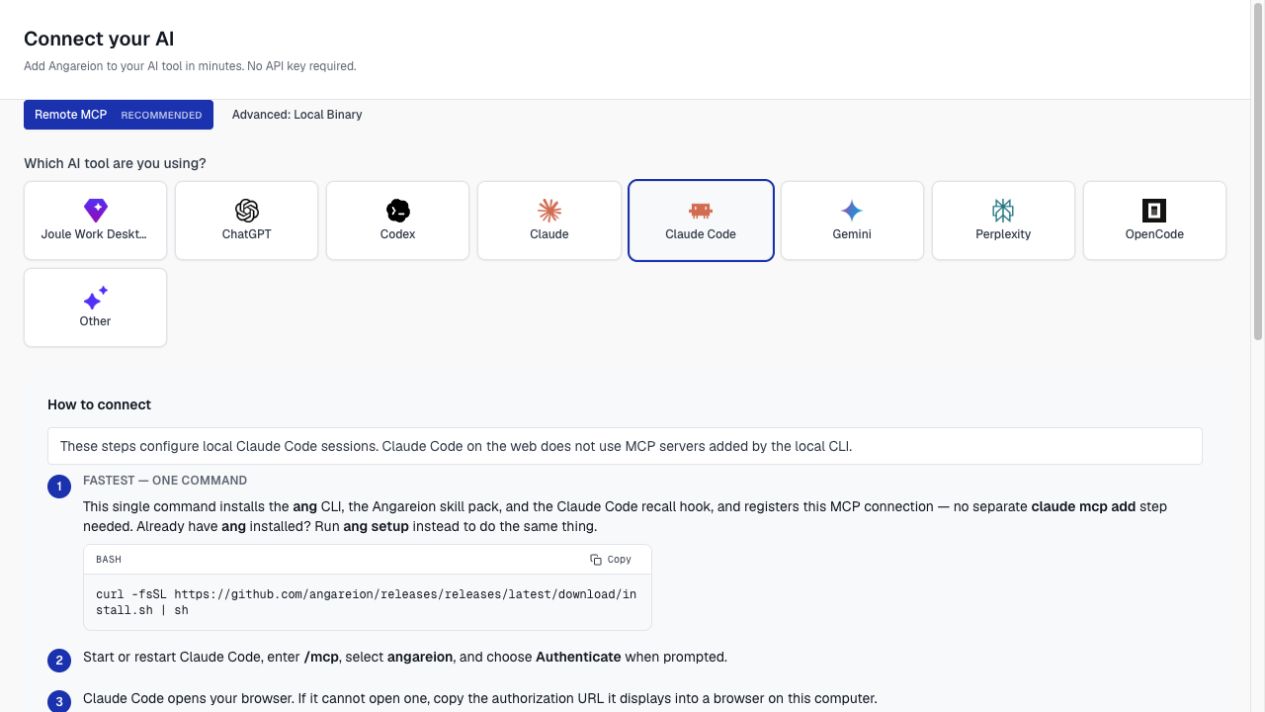
The Connect guide walks you through your client’s setup. Choose the appropriate connection, approve access, and verify the tools before asking for your context.
Your work can travel
Save what matters, then ask another connected assistant to pick it up. The same agent or an authorized shared scope keeps the context available.
“Save the project decisions and the remaining blockers in Angareion. Prepare a handoff for ChatGPT to review the plan with me.”
Saved in Angareion“Resume my Claude Code handoff. Retrieve the decision rationale and help me prioritize the remaining work.”
Illustrative prompts. Your assistant must call the connected tools; chat history and local files are not automatically transferred.
How an AI handoff worksMake the connection
Request Angareion beta access, then open the dedicated Claude Code Connect guide.
Add the Angareion HTTP MCP server at user scope. Open /mcp in a local Claude Code session and complete its browser authentication flow.
Optional Claude Code skills provide reusable instructions. Ask the connected session to retrieve project context or resume a handoff before starting the next task.
Questions, answered
What carries over, what needs connecting, and how to keep the work moving.
Explore the knowledge libraryConnect Angareion and explicitly save the decisions, lessons, outputs, or handoffs you want to retain. A new session can retrieve that context through the MCP tools. This does not expand the model’s context window or silently archive the full session.
The retained memories stay with the Angareion agent. A local Claude Code session using Sonnet or Opus can retrieve the same permitted context when the tools are connected. The models can still differ in how they interpret the work.
No. A project instruction file provides local guidance. Angareion supplies a separately retained, searchable knowledge layer that can include decisions from other clients and explicit handoffs. You can use both for different parts of your working context.
Save a handoff to Angareion with the task state, next steps, rationale, and blockers. Ask the destination client to resume it using the same agent or permitted shared scope. Repository files and unsaved local changes still need their own transfer path.
Retain useful facts and decisions as memories, add reference material to knowledge sources, save complete work products as outputs, and preserve unfinished work as handoffs. These are explicit workflows: Angareion does not automatically record everything you do in every assistant.
Access follows your Angareion agent identity and permitted memory scopes. Reusing the same agent across clients provides continuity; team or institutional sharing requires the appropriate scope and permissions. Connecting a new client does not give it unrestricted access to every memory.
Request Angareion private-beta access, then follow the connection guide for your client. Angareion does not supply the AI client’s subscription or change its account requirements. Compare the current Angareion editions and check the client’s own eligibility before connecting.
Keep what you learn
Request Angareion access, connect Claude Code, and build a body of knowledge that can travel with your work.
Private beta. Access is granted from a waitlist.